
Excel Training for HR Professionals
Excel Training for HR Professionals - Practical, tailored Excel training using example HR spreadsheets and workforce data you work with every day
Our Excel for HR training course helps HR professionals manage employee information, improve reporting and complete business-critical tasks more quickly, accurately and confidently. Training is available online via Teams or Zoom, or in person in London, and can be based on your own anonymised spreadsheets so that every session is directly relevant to your role.
Rather than delivering a generic, off-the-shelf course, we work alongside you on real HR examples and, where appropriate, your own live workbooks. You will learn practical techniques that make day-to-day processes easier while producing spreadsheets that are more reliable, consistent and easier for colleagues to understand.
Excel Training for HR Professionals - How Excel can support your HR work
• Employee data management: Organise employee IDs, departments, roles, hire dates, salaries and other workforce information in clear, structured tables.
• Payroll and attendance: Track absence, lateness, overtime and shift information, and calculate values accurately using formulas and conditional logic.
• Compensation and benefits: Model salary structures, calculate benefit costs and explore the budget impact of proposed changes.
• Workforce analytics: Summarise headcount, turnover, attrition and departmental data with formulas, PivotTables, charts and interactive KPIs.
• Performance and tenure: Calculate length of service, monitor appraisal dates and use Conditional Formatting to highlight actions that are overdue.
Excel Training for HR Professionals - Who this course is for
This course is ideal for HR professionals, people teams, payroll and reward specialists, recruiters, learning and development teams, and anyone who uses Excel to maintain employee information or produce workforce reports. It is suitable for complete beginners, people refreshing existing skills and experienced users who want to work more efficiently.
Excel Training for HR Professionals - About your trainer
Gina Cohen brings first-hand HR and compensation experience to the course. She previously worked as a Compensation Controller at a large US investment bank and has since worked with numerous HR departments on a consultancy basis, helping them improve their spreadsheets, reporting and day-to-day processes. Gina has also taught many HR professionals, so the training combines strong Excel knowledge with a practical understanding of the data, reporting challenges and time pressures faced by HR teams.
Excel Training for HR Professionals - Course benefits
• Quicker HR processes: Use efficient methods, formulas and shortcuts to reduce repetitive work and turn lengthy tasks into streamlined processes.
• More consistent formulas: Reduce hard-coded numbers and inconsistent calculations that create problems in future reporting.
• More reliable workbooks: Review outdated methods and build spreadsheets that are fit for today’s processes and adaptable for the future.
• Less reliance on one spreadsheet expert: Create files that are easier for colleagues across the organisation to understand and maintain.
• Greater confidence: Make useful efficiency and accuracy improvements without worrying about “breaking” a working spreadsheet.
Excel Training for HR Professionals - Training tailored to your needs
Everyone attending completes a training-needs form before the course. We then focus only on the topics that will be useful to the group. Sessions can include coaching on your own HR spreadsheets, practical Excel tips and techniques, support with improving an existing workbook, or structured learning from beginner through to advanced level.
Excel Training for HR Professionals - What you will learn
• Structure employee data so it is easy to update, filter and report on.
• Use drop-down lists and other controls to improve data consistency.
• Apply formulas such as XLOOKUP, VLOOKUP, IF, SUMIF, SUMIFS, COUNTIF and COUNTIFS to HR tasks.
• Use date functions to calculate age, length of service and key review dates.
• Identify missing information, exceptions and overdue actions with Conditional Formatting.
• Create PivotTables, slicers, timelines, Pivot Charts and dashboards for clear workforce reporting.
• Clean and prepare data using tools such as TRIM, Text to Columns and Power Query.
• Build spreadsheets that are accurate, efficient and easier for others to use.
Excel Training for HR Professionals - Course content
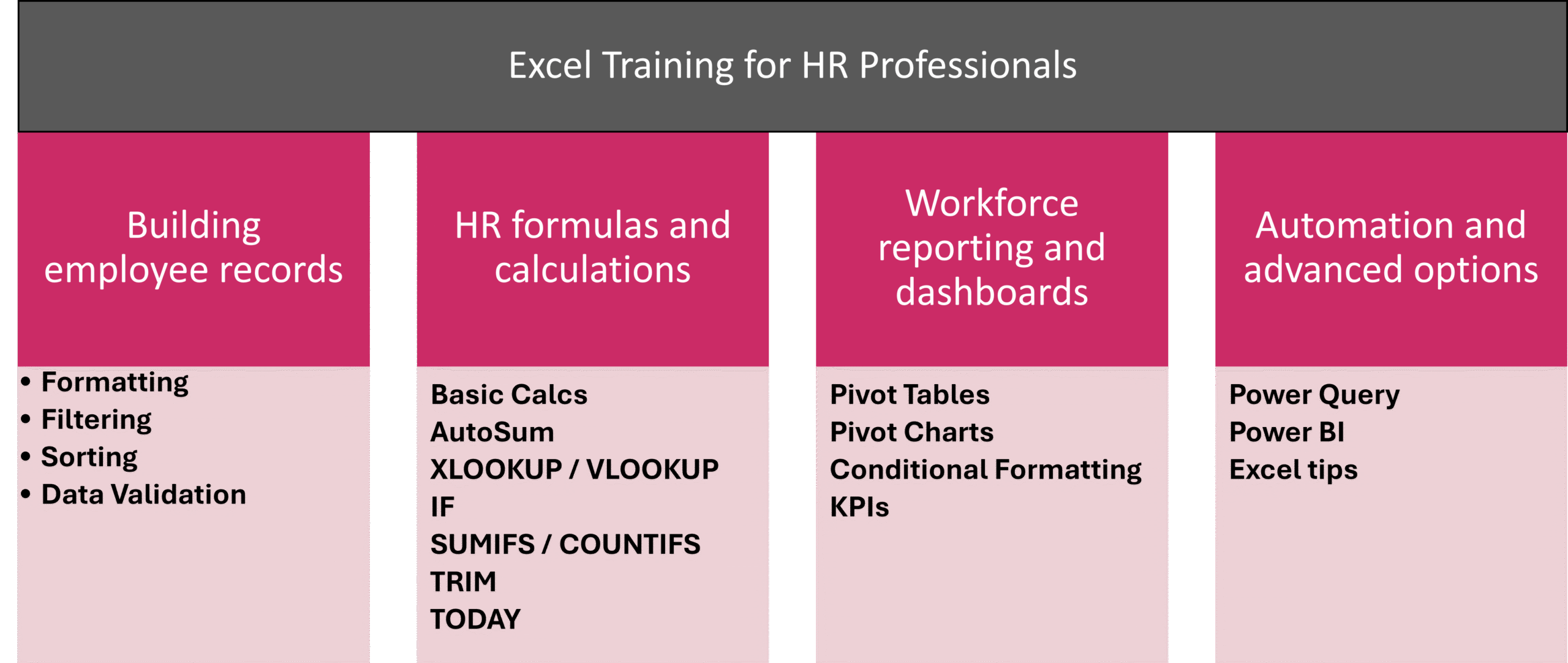
1. Building dependable employee records
• Formatting spreadsheets
• Sorting and filtering employee information
• Using drop-down lists/Data Validation to protect data quality
• Cleaning imported data with TRIM and Text to Columns
2. HR formulas and calculations
• Preparing basic calculations and using AutoSum
• Finding or collating employee details with XLOOKUP or VLOOKUP
• Using IF statements to classify records and flag exceptions
• Calculating totals with SUMIF, SUMIFS, COUNTIF and COUNTIFS
• Calculating length of service and date-driven deadlines with TODAY and other date functions
3. Workforce reporting and dashboards
• Creating PivotTables for headcount, turnover and departmental analysis
• Adding slicers and timelines for interactive reporting
• Building charts, Pivot Charts and sparklines
• Using Conditional Formatting to highlight trends and exceptions
• Presenting useful HR KPIs clearly for managers and stakeholders
4. Automation and advanced options
• Importing, cleaning and combining HR data with Power Query
• Introducing Power BI where a more advanced reporting solution is appropriate
• Excel tips, tricks and shortcuts for faster day-to-day work
Excel Training for HR Professionals - Delivery options
• Live online training via Microsoft Teams or Zoom
• In-person training in London
• One-to-one coaching or small-group sessions
• Bespoke team courses using relevant HR scenarios and your own spreadsheets
• Follow-up support for questions after the training
Book Excel Training for HR Professionals
For more information on Excel for HR Training courses in London or online please click here.
Excel Training for HR Professionals
1-2-1 sessions
Bespoke small group training
Tailored large training courses
Online or in London

"Trainer was excellent and really clear. Adapted training to needs and used examples provided by us to demonstrate how they could be applied in a real world environment."
HR Professional - London
Meet Your Instructor, Gina Cohen
Microsoft Excel, Power BI, PowerPoint, Word, Outlook and Teams trainer with eleven years experience in the Finance department at Morgan Stanley. Has been teaching and consulting since 2013. Microsoft Training Classes in London or online.